Discover our trainings and webinars
Looking for training?
Let us know on what product or solution you’d like to receive training and we’ll get back to you shortly to arrange it.
Spinetix Digital Signage Academy
Step into Digital Signage with SpinetiX - Introductory Training

Whether you’re experienced in signage or looking to fulfill a one-off opportunity, this training session introduces the industry essentials and challenges, our solutions, our partner program, and how to move ahead with your next digital signage installation.
AVIXA-Approved CTS RU Course
 1 CTS RU Registration
SpinetiX ARYA Enterprise – Digital Signage Cloud for AV Integrators
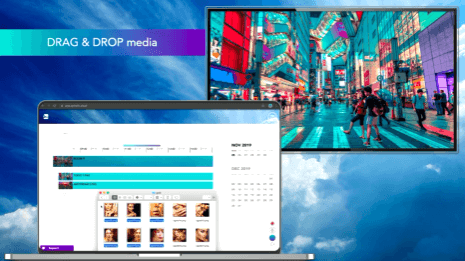
In this session, you’ll see a quick demo of the new SpinetiX ARYA Enterprise plan, along with how to get started, request a demo account, and meet the team who can help you win opportunities.
AVIXA-Approved CTS RU Course
1 CTS RU Registration
Elementi Software Essentials – Entry Level Training

This training session is aimed at dealers and end-users who want to get started with Elementi, the N1 Digital Signage Software. It complements the overview that the “Step Into Digital Signage” introductory training provides.
AVIXA-Approved CTS RU Course
1.5 CTS RUs Registration
Webinars

AMX Training by Harman
Looking for AMX by Harman training?
1. Start by creating an AMX Training Account
Getting trained on AMX products is easy and simple! First step is to create your AMX Training Account.
To create your account, please proceed to the training Portal at: https://training.harmanpro.com/
You can also navigate to the portal from the AMX main site, as show below:

Next, click on “Login”:

On the right side of the page, you should now see a Welcome message with “Create Account.” Proceed by clicking on “Create Account” and fill out the necessary fields in the form. Completed and submitted forms usually take a day or so to process. When your account has been created and is ready to use, you should receive a confirmation email from Harman University.
Note: If you previously had an AMX account and have not logged into the “new” Harman Training system, you should follow the instructions on the same page to “reset your password”.
2. Let’s Get Started!
Now, that your account has been created, please login using your credentials.
Once, logged in, you will notice that the Training is broken up into categories as shown below:

It is recommended that you keep up-to-date with all of the new and exciting courses that are continually being added to the “online courses” section. It is generally, recommended that for those who are new to AMX, start by taking some of the introductory courses offered here before continuing on to a Certification path.
3. Path to Certification
AMX offers various Certification “paths”. These certifications are listed below:
-
- AMX Programmer (Networked AV)
- AMX Technician (Networked AV)
- AMX Technician (Enova)
- AMX Designer (Video and Control)
- AMX Programmer (RMS) * Programmer Certification Required
- AMX Programmer (Netlinx)
You will find the Certification paths by selecting “Certifications” under the Training categories.
Note: Most Certifications can be completed virtually, if desired. Otherwise, proceed to the “Instructor Led” courses section.
Choosing which Certification path you follow first we depend on several factors:
-
- Is your company divided by roles? If this is the case, follow the Certification path that best describes your role in the company.
- If your company is made up of a few or you wear “many hats”, it is advised to start with Design, Install, and then Programming.
Once, you have chosen your Certification path, proceed by clicking on the link to that path.
You will be presented with the following (Netlinx Certification shown):

If you have any questions, regarding AMX Training please contact Harman University at or