Introducing the MediaMatrix SCION!

Peavey® Launches Third Generation MediaMatrix® SCION® Platform at InfoComm 2022

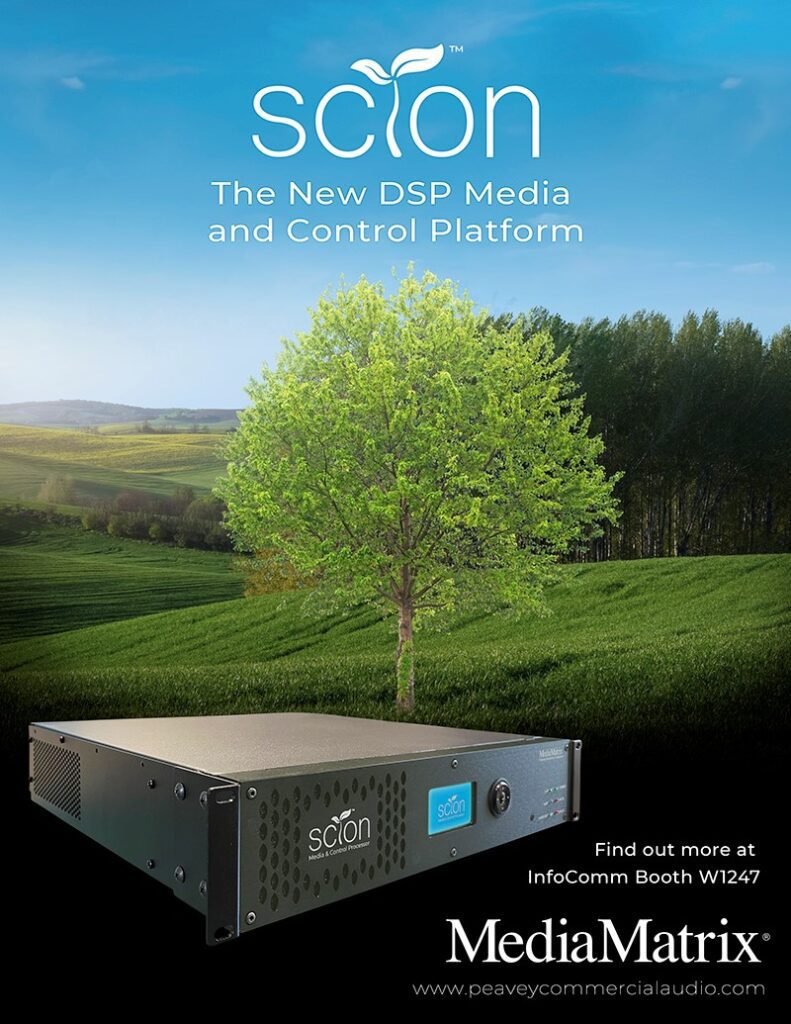
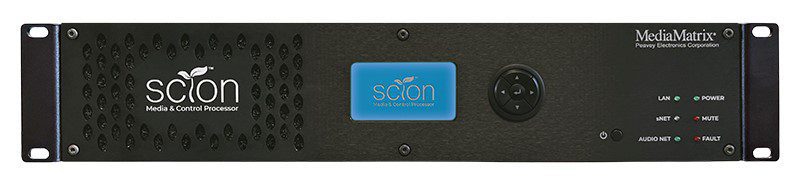
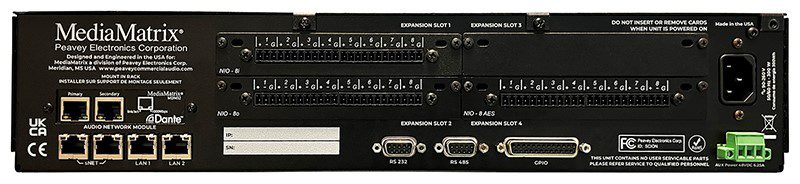
MediaMatrix®introduces SCION®, the all-new and powerful Media and Control processor. Shaping the third generation MediaMatrix offering, SCION calls upon 30 years of engineering prowess and market expertise in DSP and networked audio to deliver the most powerful media and control system available today.

SCION, a descendant of the legendary MediaMatrix NION® platform, transcends its predecessor leveraging ADi’s cutting-edge SHARC® DSP architecture providing a fully scalable, configurable and flexible media and control processing system. At the heart of the new Peavey MediaMatrix ‘S’ series ecosystem – PCA announces MediaMatrix sNET™ the native AES67 media transport protocol capable of delivering up to 512×512 networked audio channels from a single device. Designed as a ‘Build it Your Way’ system, the SCION frame can be configured from an entry-level device to a fully-featured powerhouse or something in-between with optional hardware modules giving the consultant, integrator, and end-user unrivaled fit for purpose flexibility.

Sharing in some strong elements of DNA with NION paves the way for backwards compatibility and convergence, allowing consultants to design system upgrades and fresh projects with the confidence of a simplified and seamless migration path thanks to NWare™ 3.0’s new dual-compiler tool enabling SCION and NION nodes to coexist in the same project. NIO™ Card-based I/O is also compatible with SCION providing welcomed continuity, quality and flexibility.

SCION represents the evolution of MediaMatrix and as the meaning of its name suggests a ‘shoot’ that has taken root and continues to grow organically symbolized as a tree with branches and offshoots growing as companion control and I/O products forming to shape a rich ecosystem known as the ‘S’ series.

As the world’s first digitally configured and controlled distributed audio system, MediaMatrix has grown from roots of wisdom, through decades of understanding. The launch of SCION signifies innovation in full bloom – a technology and ideal that has been nurtured over time and is ready to flex its branches to accommodate the world’s most demanding commercial audio needs.

AMX Tech Tip: Modifying SVSI’s Default Multicast Subnet

A question that is commonly asked is – “Can I change the multicast subnet that SVSI uses”? And the answer is “Yes”!

Before we dive into the how, let us look at which subnets are used in SVSI for audio and video traffic.

These values represent non-interleaved multicast streams (N2300 series use interleaved multicast streams and are not part of this addressing range) and stream numbers < 256. Stream numbers >256 require calculating the large stream number (third octet) (covered in the Networked AV Training Course).

  • Video: 239.255.37. <stream number>
  • Audio: 239.255.165. <stream number>

The subnet range above (in red) is what we are interested in modifying.
Things to consider when choosing a multicast subnet:
 Chose an address range between 234.0.0.0-238.255.255.255, this is the largest
unallocated block.
 Because there is an overlap of IP Multicast addresses to Ethernet MAC multicast addresses,
any multicast address in the [224-239].0.0.x and [224-239].128.0.x ranges should NOT be
used.

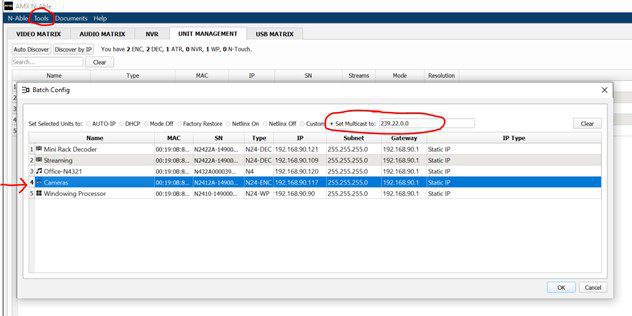
We use AMX’s “N-Able” software to modify the range (downloadable at amx.com).

  • Launch N-Able on your PC.
  • Make sure your devices have been “discovered” or added and are visible in the “Unit Management” tab.
  • Navigate to “Tools” -> “Batch Config” and select “Set Multicast to:” (circled below).
  • Enter your desired subnet.
  • Select the devices that you wish to modify (red arrow below) and click “ok”
That is all that is required for you to modify the default SVSI multicast subnet range!

XILICA’S AUDIO USES ‘BLACK MAGIC’

New audio solutions exhibited for the UC market

Xilica showcased its latest UC audio solutions, which were compared to ‘black magic’ by a Xilica exec at Barcelona ISE.

Shaun Robinson, VP of Product Management at Xilica, explained that this description refers to the huge amount of mathematics that goes into its audio solutions. Out of the complexity, Robinson says its solutions have been made easy to use, plug and play devices.  

The collaboration product designer’s range includes room kits, processors, network endpoints, speakers, user interfaces and accessories.  

Some of the speakers it showcased required only a single point of connection.  

Robinson explained the advantages of reduced cabling:

“We have USB that connects to a computer or laptop. Everything else is connected, including the speakers, so we did not put any audio connections on the speaker itself.  

“IT technicians don’t need to be worried about keeping stock of speaker cables, stripping speaker cables or accidentally getting polarity wrong; all the things that audio installers would do.  

“We do not want technicians having to do that, so just grab a patch cable or any other Ethernet cable and plug it into our amp, plug it in our speaker, and it’s going to work.”  

TECHNI+CONTACT JUST PARTNERED WITH PANOPTO

The easiest way to record and share videos! Stop typing. Start Recording.

What Panopto can do for you

CREATE – Easily capture video from multiple cameras, presentations and screens

SHARE – Securely share content so the right people can access it

SEARCH – Search your video library for the right video and the right moment

WATCH – Broadcast live and on-demand to reach everyone

MEASURE – Observe viewer behavior to ensure audience engagement

Winning solutions for the world’s top companies and universities.

Ready for next-level ROI from your video platform?
Panopto has the capabilities for sharing institutional knowledge with solutions that are easy, comprehensive, and beloved. Everything from video creation to sharing and viewing is optimized for learning environments. The best universities and corporations rely on Panopto’s market-leading solutions every day.

HEC MONTREAL – A BETTER LEARNING EXPERIENCE FOR BOTH IN-ROOM AND REMOTE CLASS PARTICIPANTS WITH XILICA’S SOLARO DSPS

HEC Montreal – A better learning experience for both in-room and remote class participants with Xilica’s Solaro DSPs with built-in HearClear AEC.

SOLUTION BENEFITS

Clarity of communication for hybrid students with HearClear acoustic echo cancellation, and Xilica noise reduction technology.

Integrated status and mute sync for Microsoft Teams drives easy, user-friendly conferencing system with the tools users already understand.

Ultra-low-profile eliminates in-room AV racks and keeps infrastructure hidden, so the focus can be on teaching – not technology.

IMPACT

HEC Montréal’s new Xilica Solaro systems provide both faculty and students with smooth, high-quality audio performance that results in a better learning experience for both in-room and remote class participants. The integrated HearClear AEC technology professionally removes the disruption of unwanted echo and noise, while built-in Dante audio networking streamlines operations, monitoring, and management. The modularity of Xilica’s systems also provide the additional advantage of scalability as hybrid learning continues to evolve.

TECHNI+CONTACT APPOINTED CANADIAN DISTRIBUTOR FOR PATTON ELECTRONICS

Patton Electronics, a leading US manufacturer of Pro-AV, Unified Communications, and industrial connectivity products and services, has signed a distribution agreement with Techni+Contact Canada Ltd, to be a national distributor for the commercial AV markets.

Patton’s connectivity solutions are used in government, healthcare, hospitality, leisure sports & entertainment, transportation, retail, as well as energy, mining, and utilities.

Patton made headline news earlier this year with the introduction of the world’s first Dante AV over IP Gateways (Encoders & Decoders). The FPX6000 series connect the AV product ecosystem—such as cameras or monitors—to the IP network. Dante AV brings ease-of-use, seamless multi-vendor interoperability, and an integrated control experience to AVoIP. The gateways deliver the highest image quality of any 1-Gbps solution by using JPEG2000 – visually lossless 4K60 with no generational losses when re-encoding.

“Techni+Contact is a welcome addition to the Patton channel as a distributor focused on the Pro-AV market” said Burton Patton, Patton’s’ Executive Vice President. “We needed a strong and market-trusted partner with Pro-AV skill sets of Techni+Contact to represent us in Canada.”

“Our corporate and government client-base rely on us to offer best of breed technology solutions. Since Dante AV supports audio-video-data networks on a standard enterprise gigabit Ethernet network, Patton’s AV capabilities allow us to offer our customers reliable, robust, and cost-effective AV integration,” said Julie Legault, President, Techni+Contact Canada.

DISTRIBUTION ANNOUNCEMENT & TECH TIP – UNITEK SOLUTIONS

Techni+Contact Canada is very pleased to announce that we are now distributing UNITEK product solutions in Canada. UNITEK is a manufacturer of a wide range of solutions from USB Storage, Video & Network Adapters, USB Hubs, Cable & Extensions, USB Chargers, Audio & Video Accessories and Mobile Accessories.

A very common and popular application for the USB extenders is when you want to send 1080P30 video over a 10-meter distance for example from a Minrray camera’s 2.0 port to a computer’s USB port for video conferencing such as Microsoft Teams and Zoom.

Likewise, from the same room PC, we can send the digital 4 channels of USB audio from the computer to the Xilica DSP for instance, where the audio is processed for the conference space also using a second UNITEK 10-meter extension cable. See below design as an example.

Standard USB cables are limited as to the distance they can span. With engineered extenders, such as the UNITEK products, this can be overcome so the devices do not need to be so close in relation to each other. This added flexibility for the installation means devices can be placed out of sight, such as under tables, behind displays, in cabinets or pretty much anywhere you can run the USB cable.

Plus, since the signal is digital, it also has a less chance of encountering interference and ground loops. Care must still be taken when running cables in walls and ceilings to meet code regulations and standards.

Finally, with USB extensions, if the room configuration changes, one can always add any of the UNITEK hubs to the system as dozens of devices can live on a single USB port.

HOW DO YOU SELECT THE PROPER LENS FOR A CAMERA OPTIMALLY?

When choosing a PTZ camera, Minrray or other mdoel, it is important to understand which lens options are available. Before we dive into the specifics, let us look at what “field of view” (FOV) is and how it impacts the overall viewing experience.

FOV can be described as: “how much of an object is visible after viewing it through an optical lens”.

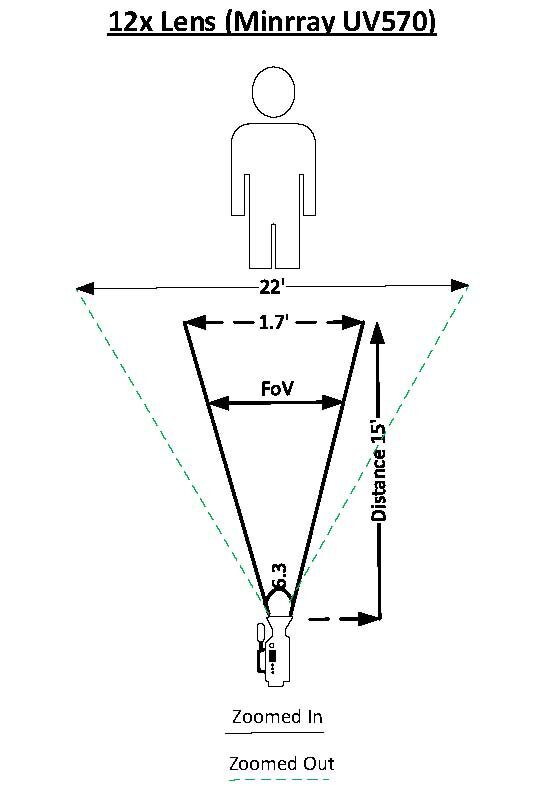
It is important to understand that there are two different specifications to consider – Horizontal FOV and Vertical FOV. Below is an example of Horizontal FOV with a lens, having 6.3 degrees FOV (tele). We can observe at 15 feet from the subject, there is 1.7’ visible when the camera is zoomed in, and 22’ when zoomed out.

The notion that “bigger is always better” does not hold true when selecting a lens. Careful consideration MUST be taken to match the environment and the needs of the installation to the correct lens type.

The chart below can be used as a “general guideline” (distance from camera to subject):

Lens options are available in resolutions supporting Full HD (1920x1080p) up to 4K.

There are many online tools available to aid in lens calculation, but caution should be exercised as specifications between manufacturers can widely vary. When in doubt, please consult with your local Techni-Contact sales manager or technical specialist for further assistance.

DO YOU ASK YOURSELF “WHERE CAN I INSTALL THE AV EQUIPMENT IN THIS BOARDROOM?”

The Xilica Solaro QR1 is the little brother in the line of fully configurable, open architecture DSP Processor.  The QR1 has a wide range of optional card slot available from USB audio, GPIO, AES/BEU, analogue in and out to relay cards.  Standard 4×4 Dante networking comes standard as does AES67 connectivity. 

As many integrators are challenged with “where can I install the AV equipment” in many boardrooms. The QR1 is literally so small, it can be installed right under the boardroom table, in a cabinet, above the ceiling.  Literally anywhere. This little powerhouse does not require to be installed next to an electrical outlet as it can be powered by a POE switch.  That is right!  This DSP is POE powered which makes the QR1 extremely flexible for installations. 

As this is an open architecture design platform, the QR1 will easily fit the requirements from a boardroom/conference space to a small facility with multi-zone paging/BGM solution. When a client requires an AEC (Acoustic Echo Cancelation) there is no requirement for extra hardware, simply request an AEC license for the client to unlock that feature.  A little reprogramming of the design in Xilica Designer (Open Architecture DSP software) and the client is set to go.

 For larger channel I/O (larger than 16 channels), the FR1 would be the solution to use.

With the same DSP power as the big brother Solaro FR1 and the control scripting abilities of LUA over IP, the QR1 has shown to be a true Powerhouse with its innovative design and features.

Sign up to receive our emails

0