Easy-to-use, AVoIP evidence presentation, web conferencing, and distribution solution for courtrooms
Judges stay in control of evidence presentation at all times
Cost-effective technology – no racks full of equipment or room control system needed
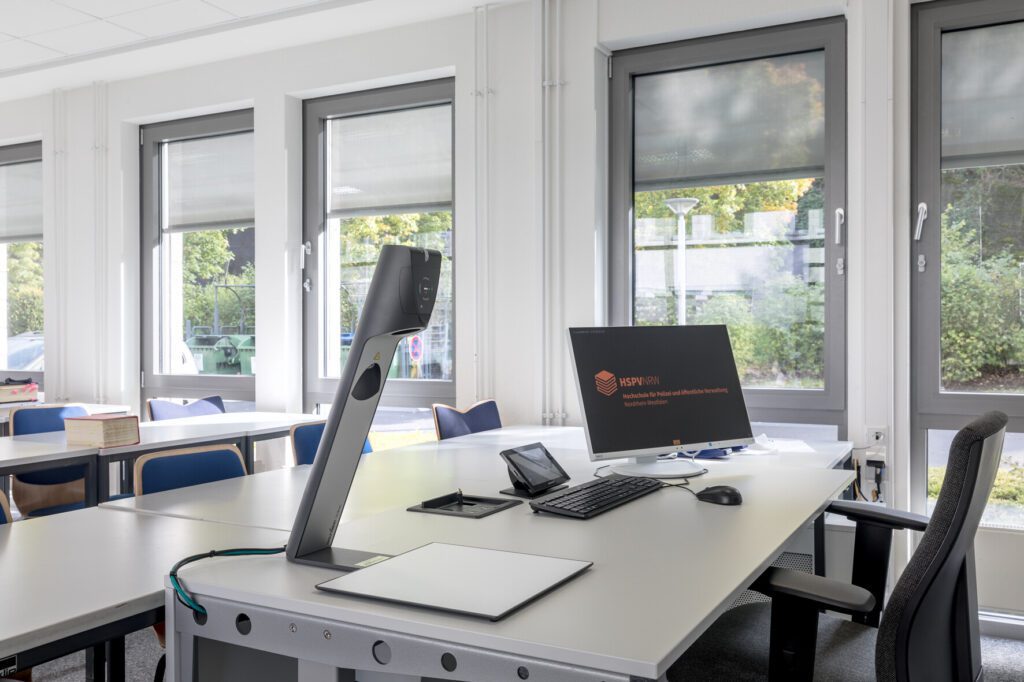
Cynap as centrepiece AV appliance, runs vSolution MATRIX connected to Cynap Pure Receivers and WolfVision Visualizer providing versatile end-to-end, all-in-one multi-source, digital and analogue evidence presentation system
Hybrid courtrooms remain popular because they bring greater efficiencies
Hybrid workflows save time, make scheduling easier, and help to reduce backlogs.
Preserving the integrity of the court process
Using ‘Preview’, ‘Publish’, and ‘Stop Sharing’ options, the judge, or clerk of the court uses simple drag and drop movements to push on-screen content for the judge to preview, or for jury, plaintiff, or defense attorneys to view.
Judges decide if evidence is admissible, and ‘Protected Mode’ ensures that attorneys cannot send on-screen content directly to a jury for viewing.
Electronic evidence is distributed using either wireless presentation, or via a wired HDMI connection. Physical materials are shown via the document camera.
Presented evidence can also be distributed outside of the physical courtroom during virtual court sessions.
Presenting evidence from any source
Wireless connectivity using any laptop, smartphone, or tablet
Support for AirPlay, Miracast, and Chromecast means no apps or dongles are needed
Live evidence is placed on the document camera
Wired HDMI In available for judges, and attorneys who wish to use a cable
Attorneys can also bring evidence on a USB stick and submit it to the judge
Touchscreen annotation is available at the witness stand.
Content is moderated and controlled using a simple drag-and-drop interface.
Supporting Virtual Courts
Web conferencing via Zoom, Microsoft Teams, or WebRTC-based services.
WolfVision’s vSolution App simplifies the web conferencing workflow making it quick and easy for the clerk of the court or judge to control.
Simply adding a Cynap Pure Pro wireless presentation and collaboration system to external locations such as a jail, extends the physical courtroom. For example, greater efficiency is achieved when prisoners can attend arraignments remotely via web conference.
Maximum Security in the courtroom
The system is always used in ‘Protected Mode’ to prevent unwanted or mis-timed display of evidence materials
Wireless signal strength can be adjusted to create only a small area of connectivity around the attorney tables. This prevents unauthorized attempts to disrupt court proceedings.
Separate networks for court personnel and external visitors maintains security
All wireless content is 100% encrypted
On completion of the court session, no information is stored on a any WolfVision system.
Installation advantages
Cost-effective – no more racks full of equipment needed
Quick and easy installation
Ease of use keeps training requirements to a minimum
Customisable peripheral controls take care of the tasks that would normally require a room control system. Reduces cost, reduces number of boxes.
Less boxes means fewer potential points of failure
Easy integration with other infrastructure such as IP cameras, audio, & recording equipment.
Eliminate compatibility issues between devices. All core functionality is performed using WolfVision systems
Standard design already widely used. Simply adjust the number of Cynap Pure Receivers needed, depending on how many extra screens are required in the room.
We take you through some of the most important factors when considering what to buy!
What is a document camera / Visualizer?
A document camera (or Visualizer / Visualiser as they are also known) is a very flexible presentation tool. It consists of a camera combined with a light system, positioned over a reflection-free working surface.
Physical materials such as books, photographs, and other 3D objects can be placed simply onto the working surface. Content is picked up, and a high-resolution output signal provided to projectors or monitors for on-screen display.
When a Visualizer is connected to a computer using a web conferencing service, images and video are easily shown to both in-room, and remote classroom or meeting participants.
Document cameras are popular in education, business and judicial environments. They provide excellent imaging possibilities for working and learning applications of all types. They are commonly either installed onto a tabletop surface, or alternatively attached to or recessed into a ceiling.
How can a Visualizer improve your presentations?
Many studies* indicate that presentations made using a document camera or Visualizer, can help to make learning easier. Information presented visually is much easier to remember, and is retained for far longer than information presented only orally.
Combining materials to be presented using a document camera with other content such as PowerPoint slides, enables the media content source to be switched regularly, which helps to refresh audience attention spans. For hybrid working and learning, a document camera, when attached to a computer running a web conferencing application, helps to provide a consistent working and learning experience, for both in-person, and online meeting attendees. This is because everybody in the session sees the same on-screen content, wherever they are located.
References: Whitepaper ‘Using Visualizers to optimise presentation‘ by Chris Atherton 2011, Study by Nickerson RS (1968). A note on long-term recognition memory for pictorial material. Psychon. Sci 11(2):58-59 Survey of Wall Street Journal, ‘We don‘t pay attention to boring things‘ (Brain rules‘ by John Medina).
Peavey® Launches Third Generation MediaMatrix® SCION® Platform at InfoComm 2022
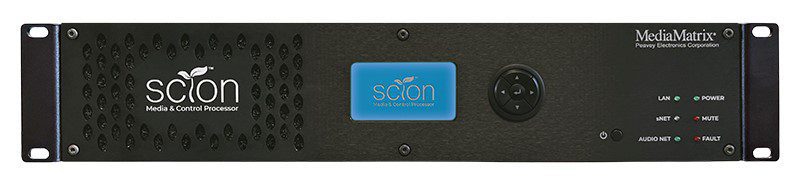
MediaMatrix®introduces SCION®, the all-new and powerful Media and Control processor. Shaping the third generation MediaMatrix offering, SCION calls upon 30 years of engineering prowess and market expertise in DSP and networked audio to deliver the most powerful media and control system available today.
SCION, a descendant of the legendary MediaMatrix NION® platform, transcends its predecessor leveraging ADi’s cutting-edge SHARC® DSP architecture providing a fully scalable, configurable and flexible media and control processing system. At the heart of the new Peavey MediaMatrix ‘S’ series ecosystem – PCA announces MediaMatrix sNET™ the native AES67 media transport protocol capable of delivering up to 512×512 networked audio channels from a single device. Designed as a ‘Build it Your Way’ system, the SCION frame can be configured from an entry-level device to a fully-featured powerhouse or something in-between with optional hardware modules giving the consultant, integrator, and end-user unrivaled fit for purpose flexibility.
Sharing in some strong elements of DNA with NION paves the way for backwards compatibility and convergence, allowing consultants to design system upgrades and fresh projects with the confidence of a simplified and seamless migration path thanks to NWare™ 3.0’s new dual-compiler tool enabling SCION and NION nodes to coexist in the same project. NIO™ Card-based I/O is also compatible with SCION providing welcomed continuity, quality and flexibility.
SCION represents the evolution of MediaMatrix and as the meaning of its name suggests a ‘shoot’ that has taken root and continues to grow organically symbolized as a tree with branches and offshoots growing as companion control and I/O products forming to shape a rich ecosystem known as the ‘S’ series.
As the world’s first digitally configured and controlled distributed audio system, MediaMatrix has grown from roots of wisdom, through decades of understanding. The launch of SCION signifies innovation in full bloom – a technology and ideal that has been nurtured over time and is ready to flex its branches to accommodate the world’s most demanding commercial audio needs.
A question that is commonly asked is – “Can I change the multicast subnet that SVSI uses”? And the answer is “Yes”!
Before we dive into the how, let us look at which subnets are used in SVSI for audio and video traffic.
These values represent non-interleaved multicast streams (N2300 series use interleaved multicast streams and are not part of this addressing range) and stream numbers < 256. Stream numbers >256 require calculating the large stream number (third octet) (covered in the Networked AV Training Course).
Video: 239.255.37. <stream number>
Audio: 239.255.165. <stream number>
The subnet range above (in red) is what we are interested in modifying. Things to consider when choosing a multicast subnet: Chose an address range between 234.0.0.0-238.255.255.255, this is the largest unallocated block. Because there is an overlap of IP Multicast addresses to Ethernet MAC multicast addresses, any multicast address in the [224-239].0.0.x and [224-239].128.0.x ranges should NOT be used.
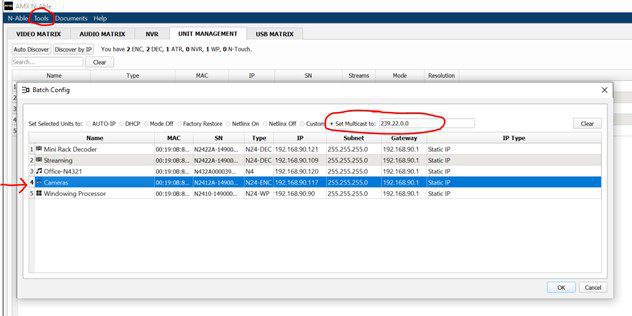
We use AMX’s “N-Able” software to modify the range (downloadable at amx.com).
Launch N-Able on your PC.
Make sure your devices have been “discovered” or added and are visible in the “Unit Management” tab.
Navigate to “Tools” -> “Batch Config” and select “Set Multicast to:” (circled below).
Enter your desired subnet.
Select the devices that you wish to modify (red arrow below) and click “ok”
That is all that is required for you to modify the default SVSI multicast subnet range!
Xilica showcased its latest UC audio solutions, which were compared to ‘black magic’ by a Xilica exec at Barcelona ISE.
Shaun Robinson, VP of Product Management at Xilica, explained that this description refers to the huge amount of mathematics that goes into its audio solutions. Out of the complexity, Robinson says its solutions have been made easy to use, plug and play devices.
The collaboration product designer’s range includes room kits, processors, network endpoints, speakers, user interfaces and accessories.
Some of the speakers it showcased required only a single point of connection.
Robinson explained the advantages of reduced cabling:
“We have USB that connects to a computer or laptop. Everything else is connected, including the speakers, so we did not put any audio connections on the speaker itself.
“IT technicians don’t need to be worried about keeping stock of speaker cables, stripping speaker cables or accidentally getting polarity wrong; all the things that audio installers would do.
“We do not want technicians having to do that, so just grab a patch cable or any other Ethernet cable and plug it into our amp, plug it in our speaker, and it’s going to work.”
The easiest way to record and share videos! Stop typing. Start Recording.
What Panopto can do for you
CREATE – Easily capture video from multiple cameras, presentations and screens
SHARE – Securely share content so the right people can access it
SEARCH – Search your video library for the right video and the right moment
WATCH – Broadcast live and on-demand to reach everyone
MEASURE – Observe viewer behavior to ensure audience engagement
Winning solutions for the world’s top companies and universities.
Ready for next-level ROI from your video platform? Panopto has the capabilities for sharing institutional knowledge with solutions that are easy, comprehensive, and beloved. Everything from video creation to sharing and viewing is optimized for learning environments. The best universities and corporations rely on Panopto’s market-leading solutions every day.
HEC Montreal – A better learning experience for both in-room and remote class participants with Xilica’s Solaro DSPs with built-in HearClear AEC.
SOLUTION BENEFITS
Clarity of communication for hybrid students with HearClear acoustic echo cancellation, and Xilica noise reduction technology.
Integrated status and mute sync for Microsoft Teams drives easy, user-friendly conferencing system with the tools users already understand.
Ultra-low-profile eliminates in-room AV racks and keeps infrastructure hidden, so the focus can be on teaching – not technology.
IMPACT
HEC Montréal’s new Xilica Solaro systems provide both faculty and students with smooth, high-quality audio performance that results in a better learning experience for both in-room and remote class participants. The integrated HearClear AEC technology professionally removes the disruption of unwanted echo and noise, while built-in Dante audio networking streamlines operations, monitoring, and management. The modularity of Xilica’s systems also provide the additional advantage of scalability as hybrid learning continues to evolve.
Patton Electronics, a leading US manufacturer of Pro-AV, Unified Communications, and industrial connectivity products and services, has signed a distribution agreement with Techni+Contact Canada Ltd, to be a national distributor for the commercial AV markets.
Patton’s connectivity solutions are used in government, healthcare, hospitality, leisure sports & entertainment, transportation, retail, as well as energy, mining, and utilities.
Patton made headline news earlier this year with the introduction of the world’s first Dante AV over IP Gateways (Encoders & Decoders). The FPX6000 series connect the AV product ecosystem—such as cameras or monitors—to the IP network. Dante AV brings ease-of-use, seamless multi-vendor interoperability, and an integrated control experience to AVoIP. The gateways deliver the highest image quality of any 1-Gbps solution by using JPEG2000 – visually lossless 4K60 with no generational losses when re-encoding.
“Techni+Contact is a welcome addition to the Patton channel as a distributor focused on the Pro-AV market” said Burton Patton, Patton’s’ Executive Vice President. “We needed a strong and market-trusted partner with Pro-AV skill sets of Techni+Contact to represent us in Canada.”
“Our corporate and government client-base rely on us to offer best of breed technology solutions. Since Dante AV supports audio-video-data networks on a standard enterprise gigabit Ethernet network, Patton’s AV capabilities allow us to offer our customers reliable, robust, and cost-effective AV integration,” said Julie Legault, President, Techni+Contact Canada.
Techni+Contact Canada is very pleased to announce that we are now distributing UNITEK product solutions in Canada. UNITEK is a manufacturer of a wide range of solutions from USB Storage, Video & Network Adapters, USB Hubs, Cable & Extensions, USB Chargers, Audio & Video Accessories and Mobile Accessories.
A very common and popular application for the USB extenders is when you want to send 1080P30 video over a 10-meter distance for example from a Minrray camera’s 2.0 port to a computer’s USB port for video conferencing such as Microsoft Teams and Zoom.
Likewise, from the same room PC, we can send the digital 4 channels of USB audio from the computer to the Xilica DSP for instance, where the audio is processed for the conference space also using a second UNITEK 10-meter extension cable. See below design as an example.
Standard USB cables are limited as to the distance they can span. With engineered extenders, such as the UNITEK products, this can be overcome so the devices do not need to be so close in relation to each other. This added flexibility for the installation means devices can be placed out of sight, such as under tables, behind displays, in cabinets or pretty much anywhere you can run the USB cable.
Plus, since the signal is digital, it also has a less chance of encountering interference and ground loops. Care must still be taken when running cables in walls and ceilings to meet code regulations and standards.
Finally, with USB extensions, if the room configuration changes, one can always add any of the UNITEK hubs to the system as dozens of devices can live on a single USB port.